
More and more people are showing interest in joining this growing field. Read this article to find out where you can start.
More and more people are showing interest in joining this growing field. Read this article to find out where you can start.


7 Steps to Open Your First Trade
As trading becomes more popular, more and more people are showing interest in joining this growing field. Read this article to find out where you can start!
Table of Contents
- Step 1 – Log in to the platform
- Whatever your reason for joining the world of investing, you are probably still facing the challenge of limited time and resources to help you make your decisions. This is why many beginner traders decide to limit the number of instruments they trade when starting out.
- Step 3 – Make a deposit
- Step 4 – Get yourself ready
- Step 5 – Open a trade
- The second method is to open an "Order" window by right-clicking anywhere in the analyzed chart area and selecting "New Order".
- Step 6 – Manage your trades
- Source: xStation 5
- Step 7 – Close the trade
7 Steps to Your First Trade
Opening your first trade may seem challenging at first. Whether you want to trade EURUSD through CFDs or buy Apple shares, most traders prefer to rely on a solid plan that can guide them throughout the entire trading process.
This article outlines seven steps you can take to prepare yourself before placing your first trade and serves as a guide on your journey to exploring the global financial markets.
Step 1 – Log in to the Platform
The award-winning xStation 5 platform is designed to help traders quickly and easily find everything they need, regardless of their level of experience.
The first step towards opening your first real trade is logging in to the platform.
Click here to log in to xStation.
Trading CFDs on margin involves a high level of risk. It may not be suitable for all investors, so please make sure you fully understand all the risks involved. Most retail clients lose money when trading CFDs.
If you need some assistance while getting familiar with our trading platform, feel free to explore XTB's Trading Academy, including a series of articles on how to use the xStation 5 platform.
Download the platform now!
Trading CFDs on margin involves a high level of risk. It may not be suitable for all investors, so please make sure you fully understand all the risks involved. Most retail clients lose money when trading CFDs.
Step 2 – Choose the Market That Suits You Best
In most cases, investments in financial markets are made to grow capital. However, at the beginning, many investors have limited time to analyse the market and prepare an effective investment strategy.
The XTB trading platform gives you the opportunity to invest in a wide range of derivatives, such as CFDs on forex, indices, commodities, and stocks. Contracts for Difference (CFDs) are extremely popular instruments. They are leveraged products, which means that traders are only required to make a small initial deposit to gain greater market exposure. However, you should also keep in mind that due to leverage, both potential profits and potential losses are increased.
Whatever your reason for joining the world of investing, you do not have unlimited time and resources to help you make every necessary decision. This is why many beginner traders decide to limit the number of instruments they trade when starting out.
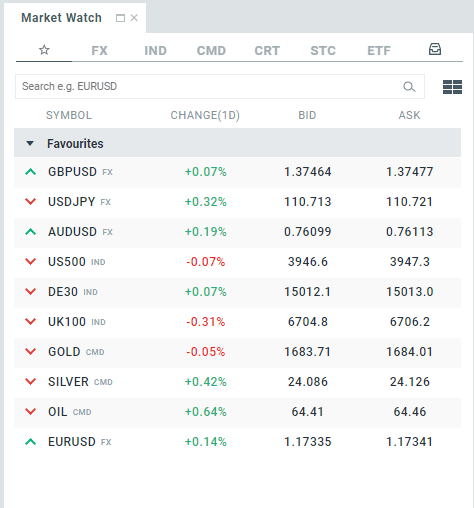
Discover XTB's range of trading instruments here.
Step 3 – Make a Deposit
The first deposit into an investment account depends entirely on each trader's individual preferences. XTB does not set a minimum initial deposit; traders should analyse how much capital they can afford to invest.
First, you should define your own expectations and attitude towards risk. It is important to remember that the more ambitious the goals an investor sets, the more capital they may need to achieve them.
CFDs allow you to use leverage, which is why they are considered a high-risk market. However, thanks to leverage, you can open relatively larger positions.
The good news is that making a deposit with XTB is quick and easy through bank transfers or credit cards.
Read more about our deposit methods here.
Step 4 – Get Yourself Ready
Modern technology has given us quick access to global markets, which are now within reach of every investor. However, this has also led many less experienced aspiring investors to enter the markets without any prior or appropriate knowledge or strategy. So, make sure you don't make the same mistakes!
Education is essential for every trader, especially at the beginning of their journey, as mistakes often occur during the early stages of their trading career. Whether you trade based on fundamental analysis (economic reports) or technical analysis (technical signals), it is important to be absolutely clear with yourself, even before trading, about when you want to open a trade and under what circumstances you would be prepared to close it.
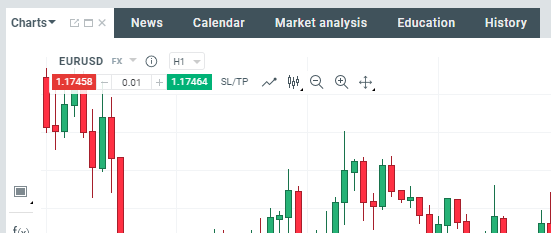
The XTB trading platform offers many useful tools for market analysis, meaning investors do not have to search for additional information on external websites.
The integrated economic calendar, updated in real time, allows you to monitor the economic situation and track the release of reports that may have a significant impact on the market.
In addition, it also displays market news prepared by XTB's team of market experts, providing an overview of the current situation from the perspective of macroeconomic data and interesting technical observations.
The platform also provides a table of the most important market movers and the instruments that have recorded the largest price changes over a specific period.
Furthermore, the Education section is full of high-quality materials for traders at different levels of experience.
Step 5 – Open a Trade
There are several ways to open a new trade, either through the Market Watch window or directly from the chart.
Chart
Trading directly from the chart is the easiest way to place your first trade. All you need to do is select the trade volume and click the green price button if you want to buy or the red button if you want to sell.
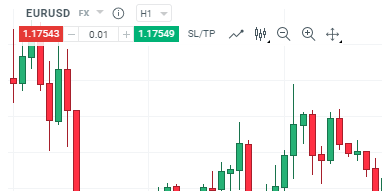
Another way to open a new trade is to open an "Order" window by right-clicking anywhere in the analysed chart area and selecting "New Order".
The information related to your open trade will immediately appear in the order panel.
Market Watch
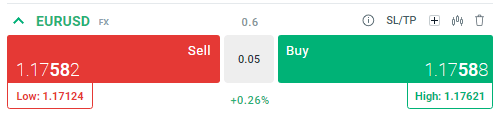
Another way to do this is by using the Click & Trade panel, which will appear after clicking on the selected instrument. You only need to select the trade volume and choose its direction by clicking the red Sell button or the green Buy button.
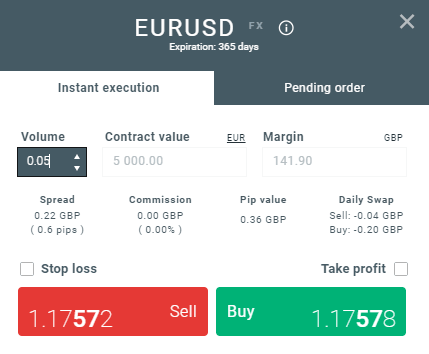
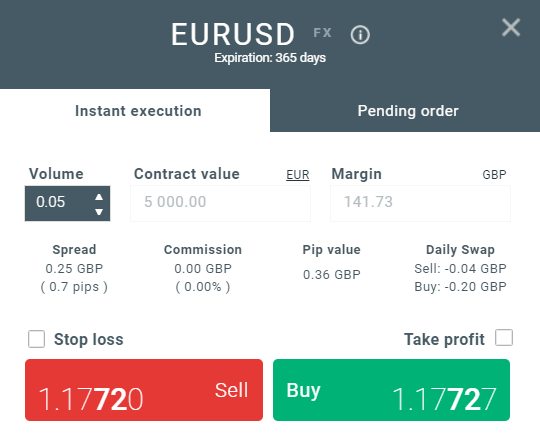
Another way is to open the order window by double-clicking on the instrument symbol.
The built-in calculator will provide you with information about the transaction's nominal value, required margin, spread value, commission, pip value, and daily swap value. If you decide to set Stop Loss or Take Profit levels, the calculator will also provide an estimated loss or profit in the event that either order is triggered.
You will then simply need to adjust the order volume according to your investment strategy and click the Sell or Buy button.
Step 6 – Manage Your Trades
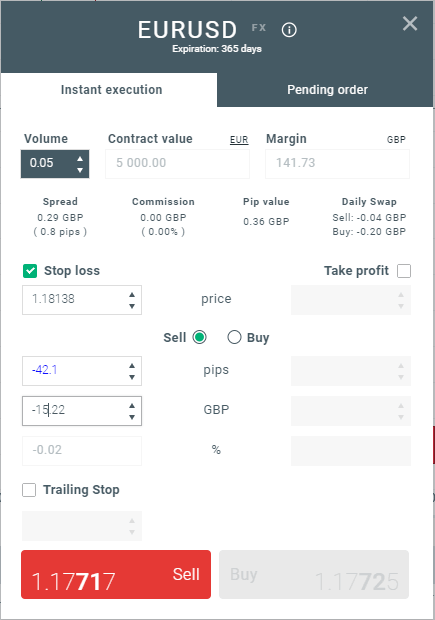
To protect your trade, you can use Stop Loss or Take Profit orders. A Stop Loss order allows you to limit your losses when the price moves in an unfavourable direction, while Take Profit automatically secures your profit at a predefined level. Thanks to these orders, there is no need to monitor your position constantly.
Both orders can be added at any time after opening a trade or while opening it. There are several ways to set the parameters in the order window:
-
Setting their levels.
-
Specifying the distance in pips.
-
Entering the nominal value.
-
Specifying the percentage by which your current account balance will increase or decrease when the SL/TP is triggered, or setting the loss/profit amount.
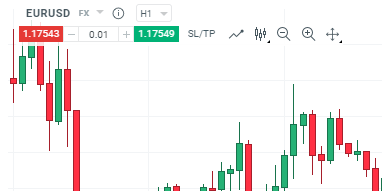
For more experienced traders, there is a faster way to set these orders through the Click & Trade panel in the upper-left corner of the chart.
To change the Stop Loss or Take Profit levels, simply drag the Stop Loss and Take Profit symbols on the chart to the desired level.
You can also double your position (open another trade of the same volume) or reverse it (close the trade and open a new one in the opposite direction) by clicking the buttons on the right-hand side of the open trade.

Step 7 – Close Your Trade
Closing an "order" is the most challenging part of the trading process, as you need to make the right decision at the right time about when to close a trade that will generate a profit or one that will result in a loss. You can close a trade by executing Take Profit or Stop Loss orders. If you change your mind, you can also easily close the trade manually using the traditional method.
Closing an order on the XTB trading platform is quick and easy. You can do this in several different ways:
- Move your mouse cursor over your position on the chart and click the "X" button.

- Click the red "X" button on the right-hand side of the "Open Positions" tab.
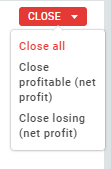
If you have more than one open position, you can click the "Close" button in the "Open Positions" tab and choose whether you want to close all positions, only profitable positions, or only losing positions.
Opening your first trade is not as difficult as it may seem at first. You should remember that proper market analysis, adjusting your trades to suit your investment strategy, and managing open positions according to your plan are essential elements of the investment process for achieving positive results in the financial markets.